How to design a website

About Course
How to design a website — a step-by-step tutorial.
Adobe Experience Manager Sites allows you to create your own web pages with ease, whether desktop or mobile focused. Before you can begin creating your website, you’ll need to have a design that you can follow. In this guide we’ll cover everything from deciding on your website’s purpose and identifying your target audience to designing, choosing a platform, and crafting wireframes.
Decide what your website is for and what you want it to achieve.
Before you can make decisions on the design of your website, it’s important to focus on why you’re designing a site. Think about who will visit your site, as this can help inform decisions later down the line.
Start by thinking about what you want your site to do. For example, are you a retailer trying to reach new customers, or are you more concerned with sharing information about your nonprofit? It’s common to have multiple reasons for building a site. If this is the case, consider building a page to suit each purpose.
Common websites include:
- Ecommerce website
- Event website
- Nonprofit website
- Travel website
- Business website
- News website
Once you know the type of website you want and the purpose behind it, you can start to think about the design of your webpages.
Define your website’s target audience and what they need from it.
In addition to your website’s purpose, your target audience will dictate the design of your webpages.
Knowing your audience comes with a variety of benefits. It allows you to tailor your message and your website to the people you want to speak to and direct them to the right channels.
Understanding your audience can also make it easier to know their pain points and main concerns — something you can address on your site. Tailoring your content to your customer’s needs allows you to build strong relationships, increasing customer retention, advocacy and loyalty.
Choose a website platform to build your site.
Website builders and content management systems (CMS) are tools that can help you design, publish, and customize your website. Using a website builder or CMS speeds up development, with prebuilt solutions and templates that streamline processes.
Selecting the right platform or CMS is a critical step in website design. You should evaluate each platform based on factors like ease of use, customization options, scalability, and available templates.
Features to consider when choosing a website builder platform.
When selecting a platform to build your site, look for:
- Quick site creation
- Ease of use on both mobile and desktop devices, and pages that load quickly
- A content management system that allows you to build a common shared environment
- Content insights on your platform
- Project workflows
- A website builder or CMS that aligns with your budget
- Versatility
Website builder platforms to consider.
Here are the pros and cons of some of the leading platforms:
- WordPress. One of the most popular platforms for designing a website because of its flexibility. It’s easy to use if you stick to the basic elements, but more complex functions may require a developer.
- Wix. Known for being intuitive and easy to use with a library of templates, built-in SEO features and helpful support options.
- Squarespace. A favorite among people in creative fields, Squarespace is known for its high-quality, award-winning templates.
- Adobe Creative Cloud. Creative Cloud provides a free website builder, Adobe Express, which allows you to create a single webpage quickly and easily. Learn how Deloitte used Adobe Creative Cloud to make an impact with content.
- Shopify. For those running an online store, Shopify helps you build an ecommerce website with extensive sales features that let you tap into different channels, and manage inventory.
- Adobe Commerce. Also focused on the online shopping experience, Adobe Commerce uses artificial intelligence (AI) and integrations with other Adobe products to help you build highly personalized customer experiences. The drag-and-drop interface is easy to use, and Commerce supports managing multiple channels, brands, and geographic locations. See how Coca Cola increased their revenue and conversions with Adobe Commerce.
Plan your website’s structure and layout.
A solid structure is essential to any website and ensures that both users and search engines can navigate the site effectively. Website navigation, or being able to find the right page, is an important part of the user’s experience and prevents visitors from feeling frustrated exploring your site.
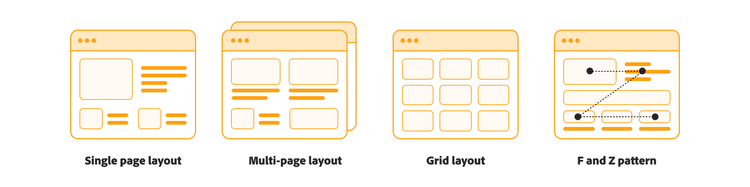
Single page layout.
A single page layout is exactly what it sounds like. Instead of having multiple pages on a website, a single page layout puts everything on one scrollable page. This format works best when websites don’t have too much information to share.
Multi-page structure.
Multi-page websites are the most common type found online. They will typically have a homepage, with links to other pages spread across the site. The multi-page structure is useful for sites that contain a lot of information and want to have multiple purposes.
Grid-based design.
A well-organized grid lets users easily scan on-page content and interact with the site. It can also help maintain consistency across different screen sizes.
F pattern and Z pattern.
Eye tracking software has shown that people generally scan websites in an F or a Z shaped pattern. Content designers will often try to prevent scanning and instead encourage readers to engage with all the text.
Your site’s layout will also depend on what makes the most sense for your goal. You should make it easy for users to quickly find the most important information on the page. Here’s a closer look at how you would lay out the sites we looked at earlier.
- Online stores. An online store could have a homepage featuring products that visitors may be interested in — like Amazon.com. Or you could use a page that mixes products with editorial content — like Nike.com.
- Portfolio sites. Professionals in areas like photography, graphic design, and marketing often create portfolio sites to showcase their work. A photographer’s portfolio site might just be a gallery of images, while a marketing agency might share case studies with a mix of text and images.
- Business websites. Business sites should be organized in a way that clearly communicates the value that the business provides. Businesses should also consider how to encourage users who visit the site to make a purchase or fill out a lead capture form.
- Event pages. Event pages should clearly communicate the important information that most people are looking for.
- Blogs. Blogs need to be organized in a way that users can find the newest or most popular content on site quickly, while also communicating what the site is about to new readers.
Define page types and develop wireframes for each one.
The next step in designing your website is to create a map of the pages you need to build. This could be a list, or it could be a visual depiction of the pages with lines to indicate how they are connected to each other.
Mapping out your website ensures that you include all the important pages and information. This is a good time to review your goals and apply them to specific pages in your map.
Student Ratings & Reviews

